
FitGirl repacks are one of the most popular solutions for gamers seeking compressed versions of large games. Despite their widespread use, users often face installation issues, such as the installer getting stuck or not opening at all. If you’re experiencing lag, stuttering, or other problems during the installation of a FitGirl repack, this guide provides you with structured solutions to resolve these issues.
Common Issues with FitGirl Repack Installers
- FitGirl Repack Stuck
- Installer Doesn’t Open
- Stuck at 99%
- How to Speed Up Installation
- Why Does Installation Take Too Long?
Possible Reasons Behind FitGirl Repack Installation Problems
Several factors can contribute to FitGirl repacks getting stuck during installation:
- Multi-tasking on a low-performance computer
- Broken or missing files
- Insufficient system performance (“potato computer”)
- Antivirus interference
- Missing necessary software (e.g., C++, DirectX, .NET Framework)
Solutions to Fix FitGirl Repack Installation Issues
Solution 1: Be Patient
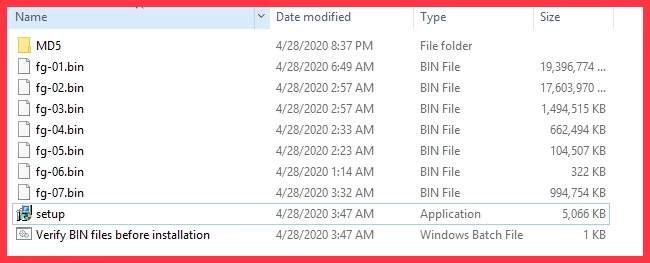
One of the most effective solutions is simply to wait. Many users mistakenly believe that the installation has stalled when, in reality, the game is still processing. FitGirl repacks often involve large .bin files that require significant time to execute, especially on mid- or low-range PCs. For example, even with a Core i7 processor, the installation process can take up to two hours.
- Bonus Tip: Before installation, verify the
.binfiles. This step may take some time but can help resolve issues during installation.
Solution 2: Limit Installer to 2GB RAM
FitGirl installers often offer an option to limit the installation process to 2GB of RAM. This option can significantly improve the chances of the installation completing successfully.
- How to Use This Option:
- Select the “Limit installer to 2GB RAM” checkbox during installation.
- This option helps prevent the installer from consuming too much system memory, reducing the likelihood of installation failure.
Solution 3: Ensure Sufficient Disk Space
Always make sure there is enough free space in the destination folder. If the installer detects insufficient space, it may become stuck. Do not ignore the warning message that appears when there isn’t enough space in the destination folder.
Solution 4: Avoid Multi-Tasking During Installation
While FitGirl repacks can technically run on low-end PCs, multi-tasking during installation can severely slow down the process or cause the installation to freeze. To avoid this:
- Close unnecessary applications before beginning the installation.
- Allocate more system resources to the installation process for smoother performance.
Additional Steps to Ensure Successful Installation
Essential Steps for Repack Success
- Use Latin and Numeric Characters in Folder Names: Repack installers sometimes struggle with non-Latin characters in the file or folder name. Avoid using symbols or non-standard characters, as this may cause the installer to fail.
[Fix] “Not Enough Rights to Write to the Destination Folder”
If you encounter this error, it’s often due to restrictive permissions. Rehashing the torrent may help resolve this issue by ensuring the integrity of the downloaded files.
- Steps for Rehashing in uTorrent:
- Open uTorrent and locate the downloaded repack.
- Pause the download.
- Right-click and select Force Re-check.
- If the files are not 100% complete, start the torrent again and allow it to finish, then rehash once more.
Disable Antivirus Software
Antivirus software can interfere with the installation of pirated games by blocking necessary files. Disable your antivirus before downloading or installing FitGirl repacks to prevent such issues.
Set User Account Control (UAC) to Minimum
UAC (User Account Control) settings can sometimes prevent installers from executing properly. Lowering the UAC to the minimum level allows complex repacks to run more smoothly.
- Steps to Adjust UAC Settings:
- Open Control Panel and go to User Accounts.
- Click Change User Account Control settings.
- Move the slider to Never Notify and save the changes.
Allocate Sufficient Virtual Memory
FitGirl installers require a substantial amount of virtual memory to unpack and install. If you encounter issues with memory allocation, follow these steps to set higher priority for the installer:
- Steps to Set Priority to High:
- Open Task Manager.
- Right-click the installer process and select Go to details.
- Right-click the details and choose Set priority > High.
Common Errors and Solutions
“I Can’t Run Setup.exe – It’s Missing or Nothing Happens!”
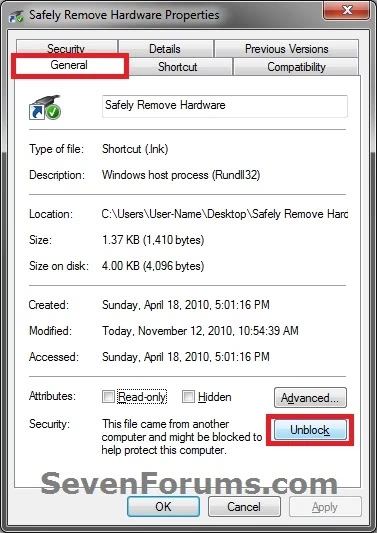
If the setup.exe file is missing or unresponsive, it’s likely being blocked by Windows Defender or another antivirus program.
- Solution:
- Right-click the setup.exe file.
- Select Properties and under the General tab, click Unblock.
- Click OK.
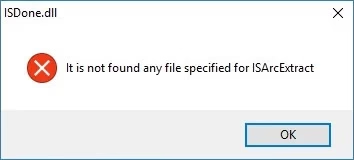
“Not Found Any File Specified for ISArcExtract”
This error often occurs when the downloaded files are incomplete or improperly named.
- Solution: Rehash the torrent to verify file integrity. If certain files are missing, download them manually or redownload the entire repack.
Conclusion
By following the solutions outlined above, you should be able to resolve most issues with FitGirl repacks getting stuck during installation. From being patient during large file processing to ensuring enough system resources and disk space, these steps can significantly improve your chances of a successful installation. Always remember to disable antivirus software, ensure the proper folder names, and make sure that all necessary files are present. Happy gaming!
can you help my setup is stuck on reduplicating files from 30 min
I have also had a problem with the installation, after i have finished the set up and the files load, it shows i have 2 bad files and the game crushes after 2 mins of playing. Does anyone know how i can fix it?
Once it happens to me But I solved this problem.
I was installing Shadow of The Tomb Raider FitGirl repack.
And suddenly it stucked at 22.1% and then I thought to download new setup.
But again it stucked at 42%.
Then I searched about it more and more but nothing solved this. Some says that you should go safe mode, you should uninstall your antivirus, and bla bla bla…..
And after an idea came in my mind and yup it worked for me.
The Idea was…..
I was installing my game in my local disk D which was filled with another games.
Then I decided to install it in my local disk E which was completely empty or have 200 to 5000 kb files.
And when I did so then I shocked that it was not stucked and also installing faster, it tooks 1.5 hours to me.
If the idea worked for me then follow me, Just kiding 😂
Well you should purchase games but I know what you guys gonna do till you can’t purchase it. And sorry for my bad english.
same here but when I tried using the 2gb ram option. it worked . try that bro it might help
It's stuck on compressing files at 95% for the last hour or so
admin iam also facing this issue i recommend to please post on this topic. please….
hi there,
1-Make sure more then the recommended space is free on the drive you are trying to install.
2-Disable Windows defender
3-redist are important but are not directly related to the repack they are for the game and you can always reinstall them, but if they appear during install just install them because installer are some time forced to install .
4-
so, this was the first time i tried fitgirl repacks, I successfully downloaded game 1, game 2 is the one with the issue, and game 3 torrent file is still downloading. Anyways, i downloaded game 2 first, had no idea what redistributables are, and it unpacked successfully, now it was asking me to repair the 4-6 redists of 64 and 86, but thinking i only needed some, i rejected one 86 redist, the process entirely stopped. Now, after successfully downloading game 1, i researched and tried to redownload game 2(sims 4), atleast 4 times, and it gives me error code -11 EVERY TIME, also it always stucks at 90.9 percent at client full build package SP02. I'm currently trying to stop my windows defender for minutes to see if i get some progress, also i did the file verification before installation as well as after the error showed up, as well as restrict it to 2 gb ram. i play on windows 7 btw, and i cannot find what error code -11 means from anywhere. please help me get this to work.
i wonder how fitgirl repacks the games?
wow man that 2gb ram option really worked