
In today’s digital landscape, having a well-optimized website is crucial for online success. One aspect of website optimization is ensuring that all the links on your site are functional and lead to the intended destination. However, it is common for websites to have broken links, which result in the dreaded 404 error. These broken links not only hinder user experience but also impact search engine rankings. To identify and fix these broken links efficiently, you can use a powerful command-line tool called Wget. In this article, we will explore how to find 404 URLs with Wget, covering the installation process on both Windows and Linux operating systems, as well as how to effectively use it to identify good and bad URLs.
Table of Contents
- Introduction
- What is Wget?
- Why Finding 404 URLs is Important
- How to Install Wget on Windows
- How to Install Wget on Linux
- Using Wget to Find 404 URLs
- Identifying Good URLs
- Identifying Bad URLs
- Conclusion
- FAQs
Introduction
Having broken links on your website can negatively impact user experience and hinder search engine optimization efforts. Therefore, it is crucial to regularly identify and fix these broken links. Wget is a versatile command-line tool that can help you automate the process of finding 404 URLs, making it easier to keep your website in top shape.
What is Wget?
Wget is a command-line utility for downloading files from the web. It supports various protocols, including HTTP, HTTPS, and FTP. While its primary purpose is downloading files, it can also be used to crawl websites and check the status of URLs. This functionality makes Wget an excellent tool for finding broken links on your website.
Why Finding 404 URLs is Important
Identifying and fixing broken links is crucial for several reasons. First and foremost, broken links negatively impact user experience. When a visitor encounters a 404 error page, it creates frustration and can lead to them leaving your website altogether. Additionally, search engines consider broken links as a sign of poor quality and may penalize your website in search rankings. By regularly finding and fixing 404 URLs, you can ensure a smooth user experience and maintain a positive online presence.
How to Install Wget on Windows
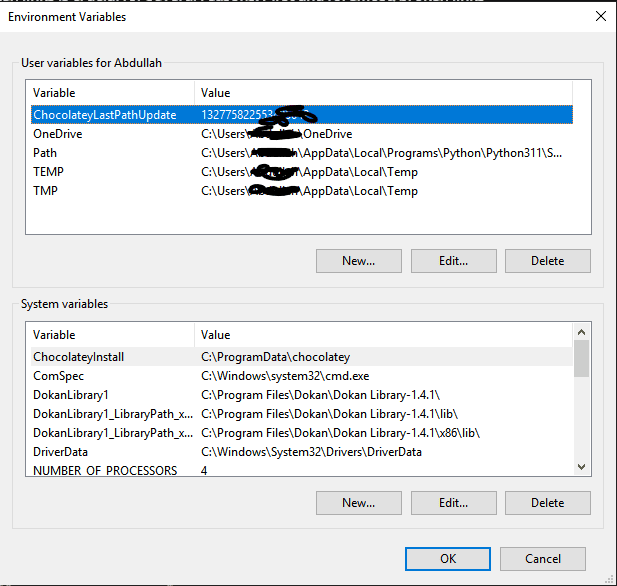
Installing Wget on Windows is a straightforward process. Follow these steps to get started:
- Visit the GNU Wget for Windows website (https://eternallybored.org/misc/wget/) using your preferred web browser.
- Download the latest version of the Wget installer compatible with your Windows operating system.
- Run the installer and follow the on-screen instructions to complete the installation.
- After installation, open the command prompt and type
wget --versionto verify that Wget is installed correctly.
How to Install Wget on Linux
Most Linux distributions come pre-installed with Wget. However, if it is not available, you can install it using the package manager specific to your distribution. Here is a general installation guide for Linux:
- Open a terminal window.
- Update the package manager’s cache by running the command
sudo apt update. - Install Wget by running the command
sudo apt install wget. - Once the installation is complete, verify the installation by typing
wget --versionin the terminal.
Using Wget to Find 404 URLs

Once you have Wget installed, you can start using it to find 404 URLs on your website. Follow these steps:
- Open the command prompt or terminal.
- Navigate to the directory where you want to save the output file.
- Use the following command to generate a list of URLs from your website:
wget --spider -o wget_output.txt -e robots=off -r -nd -nv http://www.example.com.
- Use the following command to generate a list of URLs from your website:
- Replace
http://www.example.comwith your website’s URL. - Wait for Wget to crawl your website. It will generate a file called
wget_output.txtin the current directory. - Open the output file and search for the “404 Not Found” entries. These indicate broken links on your website.
Identifying Good URLs
Not all URLs reported by Wget are necessarily bad. Some URLs may return a 404 error temporarily, but they could be valid pages in the future. To identify good URLs, consider the following:
- Check the context of the broken link. If it is a recently removed page, it may be safe to remove the link altogether.
- Use the Wayback Machine (https://archive.org/web/) to check if the URL was valid in the past. If it was, consider restoring or redirecting it.
Identifying Bad URLs
While Wget helps you identify broken links, it’s essential to differentiate between URLs that are permanently broken and those that are temporarily unavailable. Here are some tips to identify bad URLs:
- Check the content of the broken URL. If it was an outdated or irrelevant page, it’s best to remove it entirely.
- Look for alternative sources or pages with similar content. If available, update the broken link with the new URL.
- If a URL consistently returns a 404 error, consider redirecting it to a relevant page on your website.
Conclusion
Regularly checking and fixing broken links is an essential part of maintaining a well-optimized website. By using Wget, you can automate the process of finding 404 URLs and ensure a positive user experience. Remember to regularly monitor your website for broken links and take appropriate actions to keep your site in top shape.
FAQs
Q1: Is Wget only available for Windows and Linux? A1: No, Wget is a cross-platform utility and is also available for macOS and other operating systems.
Q2: Can Wget handle complex websites with JavaScript-based navigation? A2: Wget primarily works with static content. For websites heavily reliant on JavaScript, you may need to consider alternative tools or methods.
Q3: How often should I check for broken links on my website? A3: It is recommended to check for broken links periodically, especially after making significant changes to your website’s structure or content.
Q4: Can Wget fix broken links automatically? A4: No, Wget is primarily a tool for identifying broken links. After finding them, you will need to manually update or remove the broken links on your website.
Q5: Are there any alternatives to Wget for finding 404 URLs? A5: Yes, there are other tools available, such as Xenu’s Link Sleuth, Screaming Frog SEO Spider, and Google Search Console, that can help you identify broken links on your website.